Run an Avail full node using a pre-built binary, from source, with Docker, or via an infrastructure provider.
How to run an Avail node
There are four main ways of running an Avail node:
By running a pre-built binary.
By building from source
By running a pre-built image using Docker
By assisted deployment with an infrastructure provider
Note
LOOKING TO BE AN RPC PROVIDER? We welcome all community members who are looking to run an RPC node on Avail.
While the exact config of your node will depend on your unique requirements, the following flags are
required to make sure your node can be used to access all RPC methods:
--state-pruning archive:Specify the state pruning mode.
This mode specifies when the block's state (ie, storage) should be pruned (ie, removed) from the database. This setting can only
be set on the first creation of the database. Every subsequent run will load the pruning mode from the database and will error
if the stored mode doesn't match this CLI value. It is fine to drop this CLI flag for subsequent runs. Possible values: -
archive: Keep the state of all blocks. - archive-canonical: Keep only the state of finalized blocks. - number Keep the state of
the last number of finalized blocks. [default: 256]
--blocks-pruning archive:Specify the blocks pruning mode.
This mode specifies when the block's body (including justifications) should be pruned (ie, removed) from the database. Possible
values: - archive: Keep all blocks. - archive-canonical: Keep only finalized blocks. - number Keep the last number of
finalized blocks.
--rpc-methods Safe:RPC methods to expose.
[default: auto]
Possible values:
auto: Expose every RPC method only when RPC is listening on localhost, otherwise serve only safe RPC methods
safe: Allow only a safe subset of RPC methods
unsafe: Expose every RPC method (even potentially unsafe ones)
--rpc-cors all:Specify browser origins allowed to access the HTTP & WS RPC servers.
A comma-separated list of origins (protocol://domain or special null value). Value of all will disable origin validation.
--unsafe-rpc-external:Listen to all RPC interfaces.
Go to the Avail node GitHub releases page.
There you will see a lot of pre-built binaries for each version of the Avail node.
Please download the binary suitable from your system, of the latest version.
You can do this using the GUI or by running the following command in your terminal:
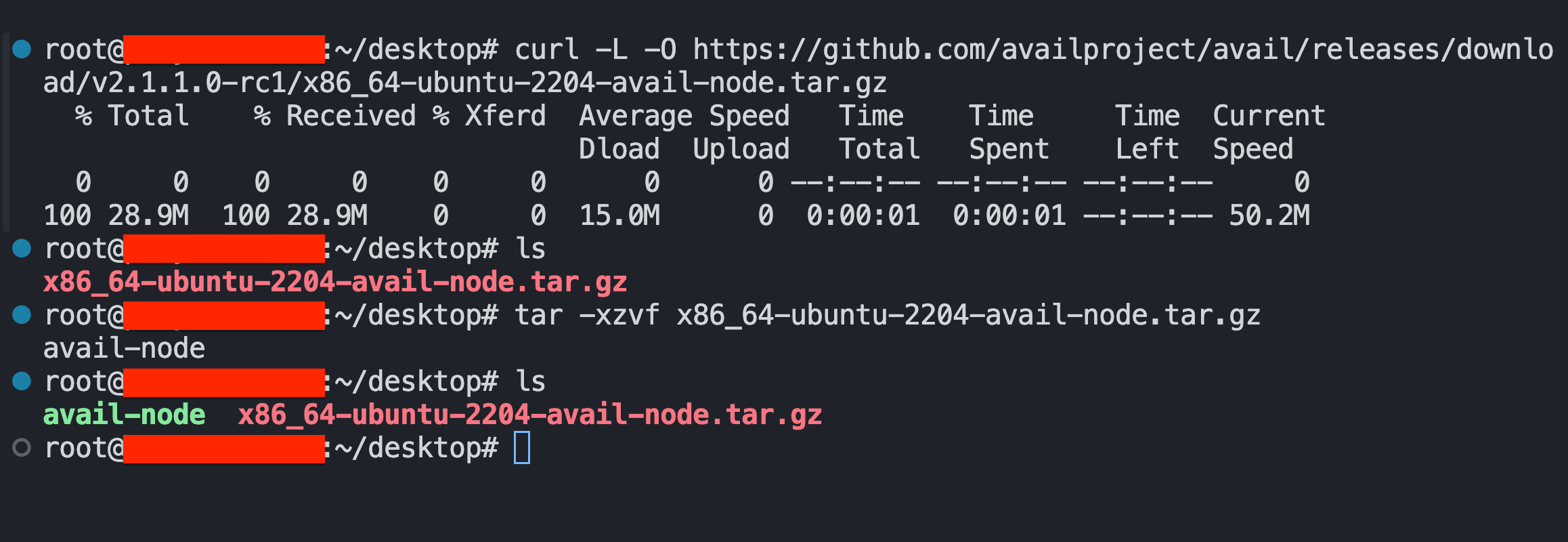
Extract the downloaded file by opening a terminal in the location of the downloaded file and using the following command:
tar -xzvf <YOUR-SYSTEM-SPECIFIC-BINARY>.tar.gz
Your terminal should now look something like this:
The file in red is what we downloaded to our system.
The file in green is the extracted binary.
Once extracted, you will see a pre-built, executable binary named avail-node in the same directory.
You can run this binary using the following command:
Your node will also appear on the Avail Telemetry site, listed under the "Node name" from the node command output.
Be sure to select the appropriate network tab at the top to view your node's status.
Additional configs
The Avail node is a highly customizable piece of software. You can fetch a list of supported commands and flags
using: