Subscribe to real-time block and data availability events using the light client WebSocket API.
The Avail light client WebSocket API allows real-time communication between a client and a server over a
persistent connection. The Web socket API can be used on its own or in combination with HTTP API to enable different pull/push use cases. HTTPS vs WSSHTTP and Websocket are two different ways of communicating with a server. HTTP is a request-response protocol,
where a connection persists for only so long as the request is being processed. In contrast, a websocket connection
persists for as long as the client and server are connected. This allows for real-time communication between the two,
and enables the client to fetch information from the server as soon as it is available, without having to
poll the server for updates.
Note
HOW TO CONNECT TO THE WEBSOCKET SERVER
You cannot use CURL to send websocket commands, since CURL cannot maintain a persistent connection.
Although there are a variety of librariries we can use, the following examples are using wscat.To install wscat, simply run:
pnpmadd-gwscat
Get started with the Websocket Avail LC API
The Avail LC Websocket API generates a unique subscription_id upon request.
This ID is used to connect to the websocket server.
The v2/subscriptions method creates subscriptions for given topics. In case of reconnects, the user needs to subscribe again.
Generate a subscription ID
The very first step in using the Avail LC Websocket API is to generate a subscription ID.
You can do that using a simple Curl request to the v2/subscriptions endpoint.
use reqwest::{Client, StatusCode};use serde::{Deserialize, Serialize};use serde_json::json;#[derive(Debug, Serialize, Deserialize)]struct SubscriptionResponse { subscription_id: String,}const LIGHT_CLIENT_URL: &str = "https://api.lightclient.mainnet.avail.so";#[tokio::main]async fn main() { let client = Client::new(); let subscriptions_url = format!("{LIGHT_CLIENT_URL}/v2/subscriptions"); let topics = vec!["header-verified", "confidence-achieved", "data-verified"]; let data_fields = vec!["data", "extrinsic"]; let response = client.post(&subscriptions_url) .header("Content-Type", "application/json") .body(json!({ "topics": topics, "data_fields": data_fields }).to_string()) .send() .await .unwrap(); match response.status() { StatusCode::OK => { let subscription_response: SubscriptionResponse = response.json().await.unwrap(); println!("Subscription ID: {}", subscription_response.subscription_id); } _ => { eprintln!("Failed to create subscription: {}", response.status()); } } // ...error handling...}
Sample Response:
{ "subscription_id": "{subscription-id}"}
Initialize the Websocket connection
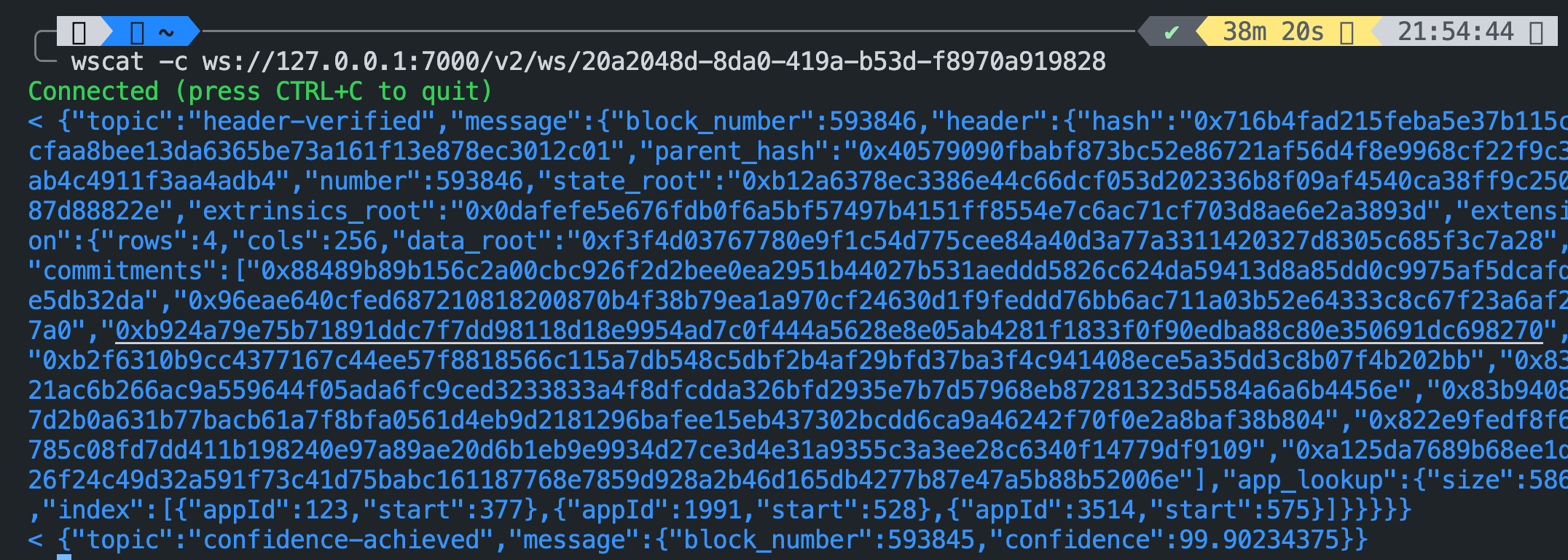
You can use this method to actually connect to Avail light client web socket. Multiple connections are currently allowed.To connect to the Avail LC websocket API, you need:
Please note that you will regularly receive information related to the topics you chose to subscribe to
for as long as the ws connection persists, even if you don't actually send any messages.
Every request should contain unique request_id field, used to correlate request with response.
Subscription IDs vs Request IDs
Each time you use the v2/subscriptions method, you will receive a unique subscription_id.
This ID is used to connect to the websocket server.Each of these IDs will be of the UUID4 format.Coming to requests, every request you make to the websocket server should contain a request_id field,
which will need to be a UUID4 value. You can choose to use a single, random UUID4 value to send all your requests,
or you can use a unique UUID4 value for each request you send. The choice is yours.Using a single UUID4 value is simple, but using a unique UUID4 value for each request can help you
correlate each response with a unique request.The Avail LC API was designed with dev experience in mind, and this way you can choose the way that suits you best.
 Every request should contain unique request_id field, used to correlate request with response.
Each time you use the
Every request should contain unique request_id field, used to correlate request with response.
Each time you use the