You can find the latest release binary in the avail-light repository.
Note
RECOMMENDED VERSION
You can find the latest release of the Avail LC from our Github repo.
We recommend devs to use the Latest release.
Light client modes
The Avail light client has two main modes of operation:
Light-client mode: The basic mode of operation and is always active no matter the mode selected.
If an app_id is not provided (or is = 0), this mode will commence. On each header received the client
does random sampling using two mechanisms
App-client mode: If an app_id > 0 is given, the application client
(part of the light client) downloads all data specific to that App ID, reconstructs it and persists it locally.
This data can then be accessed via a local HTTP endpoint.
Note
WE RECOMMEND LEARNING ABOUT APP IDs on AVAIL DA
App IDs are an important concept in the context of Avail. We recommend you go through this page in our docs to understand how they work before moving forward.
Running the light client
Note
CONFIG FLAGS
Availup supports many different config flags to support your needs.
Detailed documentation for them can be found in our Github repo.
availup is the recommended way of running the Avail light client for most users.
availup is a shell wrapper that allows you to spin up your own instance of the Avail light client
with a simple curl command.
Note
To run the Avail LC using availup, make sure you have curl installed on your system. To check, quickly:
curl --version
To spin up an Avail light client on the Turing testnet, just run this one command in your terminal:
curl -sL1 avail.sh | bash
If everything goes well, the client output will look like this:
Sample output
2024-03-20T10:50:25.528628Z INFO avail_light::light_client: Processing finalized block block_number=562690 block_delay=202024-03-20T10:50:25.528706Z INFO avail_light::light_client: Random cells generated: 10 block_number=562690 cells_requested=102024-03-20T10:50:26.069497Z INFO avail_light::network: Cells fetched from DHT block_number=562690 cells_total=10 cells_fetched=0 cells_verified=0 fetch_elapsed=540.755792ms proof_verification_elapsed=2.208µs2024-03-20T10:50:28.322706Z INFO avail_light::network: Cells fetched from RPC block_number=562690 cells_total=10 cells_fetched=10 cells_verified=10 fetch_elapsed=2.232714917s proof_verification_elapsed=20.404208ms2024-03-20T10:50:28.322987Z INFO avail_light::light_client: Confidence factor: 99.90234375 block_number=562690 confidence=99.902343752024-03-20T10:50:28.323134Z INFO avail_light::light_client: Sleeping for 14.61143875s seconds2024-03-20T10:50:28.323154Z INFO avail_light::api::v2: Message published to clients topic=ConfidenceAchieved published=0 failed=02024-03-20T10:50:28.859369Z INFO avail_light::network::p2p::event_loop: Cell upload success rate for block 562690: 0/10. Duration: 02024-03-20T10:50:41.535425Z INFO avail_light::network::rpc::subscriptions: New justification at block no.: 562692, hash: 0x3b602253298ce9bec9b5b8f0c8767f14502ccaa17a003dfba77f9d90edeaf5da2024-03-20T10:50:41.709011Z INFO avail_light::network::rpc::subscriptions: Header no.: 5626922024-03-20T10:50:41.709557Z INFO avail_light::network::rpc::subscriptions: Number of matching signatures: 5/7 for block 562692, set_id 2232024-03-20T10:50:41.709574Z INFO avail_light::network::rpc::subscriptions: Storing finality checkpoint at block 5626922024-03-20T10:50:41.709908Z INFO avail_light::network::rpc::subscriptions: Sending finalized block 5626922024-03-20T10:50:41.709966Z INFO avail_light::api::v2: Message published to clients topic=HeaderVerified published=0 failed=02024-03-20T10:50:42.936699Z INFO avail_light::light_client: Processing finalized block block_number=562691 block_delay=202024-03-20T10:50:42.936761Z INFO avail_light::light_client: Random cells generated: 10 block_number=562691 cells_requested=102024-03-20T10:50:43.472932Z INFO avail_light::network: Cells fetched from DHT block_number=562691 cells_total=10 cells_fetched=0 cells_verified=0 fetch_elapsed=536.136083ms proof_verification_elapsed=3.042µs2024-03-20T10:50:46.513570Z INFO avail_light::network: Cells fetched from RPC block_number=562691 cells_total=10 cells_fetched=10 cells_verified=10 fetch_elapsed=3.022786041s proof_verification_elapsed=17.810542ms2024-03-20T10:50:46.513706Z INFO avail_light::light_client: Confidence factor: 99.90234375 block_number=562691 confidence=99.902343752024-03-20T10:50:46.513785Z INFO avail_light::light_client: Sleeping for 15.195224667s seconds2024-03-20T10:50:46.513795Z INFO avail_light::api::v2: Message published to clients topic=ConfidenceAchieved published=0 failed=02024-03-20T10:50:47.056255Z INFO avail_light::network::p2p::event_loop: Cell upload success rate for block 562691: 0/10. Duration: 0
For MacOS machines that run on x86_64 based Intel processors, run:
./avail-light-apple-x86_64 --network mainnet
Note
You can configure the run command with a variety of config flags.
If everything goes well, the client output will look like this:
Sample output
2024-03-20T10:50:25.528628Z INFO avail_light::light_client: Processing finalized block block_number=562690 block_delay=202024-03-20T10:50:25.528706Z INFO avail_light::light_client: Random cells generated: 10 block_number=562690 cells_requested=102024-03-20T10:50:26.069497Z INFO avail_light::network: Cells fetched from DHT block_number=562690 cells_total=10 cells_fetched=0 cells_verified=0 fetch_elapsed=540.755792ms proof_verification_elapsed=2.208µs2024-03-20T10:50:28.322706Z INFO avail_light::network: Cells fetched from RPC block_number=562690 cells_total=10 cells_fetched=10 cells_verified=10 fetch_elapsed=2.232714917s proof_verification_elapsed=20.404208ms2024-03-20T10:50:28.322987Z INFO avail_light::light_client: Confidence factor: 99.90234375 block_number=562690 confidence=99.902343752024-03-20T10:50:28.323134Z INFO avail_light::light_client: Sleeping for 14.61143875s seconds2024-03-20T10:50:28.323154Z INFO avail_light::api::v2: Message published to clients topic=ConfidenceAchieved published=0 failed=02024-03-20T10:50:28.859369Z INFO avail_light::network::p2p::event_loop: Cell upload success rate for block 562690: 0/10. Duration: 02024-03-20T10:50:41.535425Z INFO avail_light::network::rpc::subscriptions: New justification at block no.: 562692, hash: 0x3b602253298ce9bec9b5b8f0c8767f14502ccaa17a003dfba77f9d90edeaf5da2024-03-20T10:50:41.709011Z INFO avail_light::network::rpc::subscriptions: Header no.: 5626922024-03-20T10:50:41.709557Z INFO avail_light::network::rpc::subscriptions: Number of matching signatures: 5/7 for block 562692, set_id 2232024-03-20T10:50:41.709574Z INFO avail_light::network::rpc::subscriptions: Storing finality checkpoint at block 5626922024-03-20T10:50:41.709908Z INFO avail_light::network::rpc::subscriptions: Sending finalized block 5626922024-03-20T10:50:41.709966Z INFO avail_light::api::v2: Message published to clients topic=HeaderVerified published=0 failed=02024-03-20T10:50:42.936699Z INFO avail_light::light_client: Processing finalized block block_number=562691 block_delay=202024-03-20T10:50:42.936761Z INFO avail_light::light_client: Random cells generated: 10 block_number=562691 cells_requested=102024-03-20T10:50:43.472932Z INFO avail_light::network: Cells fetched from DHT block_number=562691 cells_total=10 cells_fetched=0 cells_verified=0 fetch_elapsed=536.136083ms proof_verification_elapsed=3.042µs2024-03-20T10:50:46.513570Z INFO avail_light::network: Cells fetched from RPC block_number=562691 cells_total=10 cells_fetched=10 cells_verified=10 fetch_elapsed=3.022786041s proof_verification_elapsed=17.810542ms2024-03-20T10:50:46.513706Z INFO avail_light::light_client: Confidence factor: 99.90234375 block_number=562691 confidence=99.902343752024-03-20T10:50:46.513785Z INFO avail_light::light_client: Sleeping for 15.195224667s seconds2024-03-20T10:50:46.513795Z INFO avail_light::api::v2: Message published to clients topic=ConfidenceAchieved published=0 failed=02024-03-20T10:50:47.056255Z INFO avail_light::network::p2p::event_loop: Cell upload success rate for block 562691: 0/10. Duration: 0
Note
CONFIG FLAGS
You can run the Avail light client with different flags to configure it according to your needs.
Detailed documentation for them can be found in our Github repo.
Building the Avail light client from source is a more advanced option that
provides you with the maximum flexibility.
To do so:
Clone the Avail light-client repo and checkout to the specified version:
Make sure your terminal is in the avail-light directory. Create a compiled build by running:
cargo build --release
This will create a new directory named target within avail-light. Navigate to target/release using:
cd target/release
Here you will find the avail-light build. Run the build using:
./avail-light --network mainnet
If everything goes well, the client output will look like this:
Sample output
2024-03-20T10:22:23.821042Z INFO avail_light::api::v2: Message published to clients topic=HeaderVerified published=0 failed=02024-03-20T10:22:23.854448Z INFO avail_light::network: Cells fetched from RPC block_number=562606 cells_total=10 cells_fetched=10 cells_verified=10 fetch_elapsed=466.901875ms proof_verification_elapsed=10.431583ms2024-03-20T10:22:23.854573Z INFO avail_light::light_client: Confidence factor: 99.90234375 block_number=562606 confidence=99.902343752024-03-20T10:22:23.854635Z INFO avail_light::light_client: Sleeping for 19.965855416s seconds2024-03-20T10:22:23.854643Z INFO avail_light::api::v2: Message published to clients topic=ConfidenceAchieved published=0 failed=02024-03-20T10:22:24.392198Z INFO avail_light::network::p2p::event_loop: Cell upload success rate for block 562606: 0/10. Duration: 02024-03-20T10:22:43.821867Z INFO avail_light::light_client: Processing finalized block block_number=562607 block_delay=202024-03-20T10:22:43.821955Z INFO avail_light::light_client: Random cells generated: 10 block_number=562607 cells_requested=102024-03-20T10:22:44.358772Z INFO avail_light::network: Cells fetched from DHT block_number=562607 cells_total=10 cells_fetched=0 cells_verified=0 fetch_elapsed=536.778958ms proof_verification_elapsed=2.292µs2024-03-20T10:22:45.937348Z INFO avail_light::network: Cells fetched from RPC block_number=562607 cells_total=10 cells_fetched=10 cells_verified=10 fetch_elapsed=1.56179875s proof_verification_elapsed=16.692791ms2024-03-20T10:22:45.938417Z INFO avail_light::light_client: Confidence factor: 99.90234375 block_number=562607 confidence=99.902343752024-03-20T10:22:45.938564Z INFO avail_light::api::v2: Message published to clients topic=ConfidenceAchieved published=0 failed=02024-03-20T10:22:46.473163Z INFO avail_light::network::p2p::event_loop: Cell upload success rate for block 562607: 0/10. Duration: 02024-03-20T10:22:46.527044Z INFO avail_light::network::rpc::subscriptions: New justification at block no.: 562608, hash: 0xbea2a4b136c271b72314e2349577136bf7cdc7c732bc3909e280eb602b8af6432024-03-20T10:22:46.672163Z INFO avail_light::network::rpc::subscriptions: Header no.: 5626082024-03-20T10:22:46.673730Z INFO avail_light::network::rpc::subscriptions: Number of matching signatures: 5/7 for block 562608, set_id 2232024-03-20T10:22:46.673755Z INFO avail_light::network::rpc::subscriptions: Storing finality checkpoint at block 5626082024-03-20T10:22:46.674002Z INFO avail_light::network::rpc::subscriptions: Sending finalized block 5626082024-03-20T10:22:46.674087Z INFO avail_light::api::v2: Message published to clients topic=HeaderVerified published=0 failed=02024-03-20T10:22:46.674150Z INFO avail_light::light_client: Sleeping for 19.998042125s seconds
Windows Subsystem for Linux (WSL) is a Windows feature that allows you to run a Linux distribution directly on Windows,
without having to set up a separate virtual machine or a dual-boot system.However, we realise that working with WSL might be inconvenient for some users. We have therefore also included
instructions on how to run the Avail light client natively on Windows without having to go through any technical hassles.
Right click the downloaded file and extract it to a convenient location.
Then run the availup.bat file by double clicking it. This will start the Avail light client.
If everything goes well, the client output will look like this:
Sample output
2024-03-20T10:22:23.821042Z INFO avail_light::api::v2: Message published to clients topic=HeaderVerified published=0 failed=02024-03-20T10:22:23.854448Z INFO avail_light::network: Cells fetched from RPC block_number=562606 cells_total=10 cells_fetched=10 cells_verified=10 fetch_elapsed=466.901875ms proof_verification_elapsed=10.431583ms2024-03-20T10:22:23.854573Z INFO avail_light::light_client: Confidence factor: 99.90234375 block_number=562606 confidence=99.902343752024-03-20T10:22:23.854635Z INFO avail_light::light_client: Sleeping for 19.965855416s seconds2024-03-20T10:22:23.854643Z INFO avail_light::api::v2: Message published to clients topic=ConfidenceAchieved published=0 failed=02024-03-20T10:22:24.392198Z INFO avail_light::network::p2p::event_loop: Cell upload success rate for block 562606: 0/10. Duration: 02024-03-20T10:22:43.821867Z INFO avail_light::light_client: Processing finalized block block_number=562607 block_delay=202024-03-20T10:22:43.821955Z INFO avail_light::light_client: Random cells generated: 10 block_number=562607 cells_requested=102024-03-20T10:22:44.358772Z INFO avail_light::network: Cells fetched from DHT block_number=562607 cells_total=10 cells_fetched=0 cells_verified=0 fetch_elapsed=536.778958ms proof_verification_elapsed=2.292µs2024-03-20T10:22:45.937348Z INFO avail_light::network: Cells fetched from RPC block_number=562607 cells_total=10 cells_fetched=10 cells_verified=10 fetch_elapsed=1.56179875s proof_verification_elapsed=16.692791ms2024-03-20T10:22:45.938417Z INFO avail_light::light_client: Confidence factor: 99.90234375 block_number=562607 confidence=99.902343752024-03-20T10:22:45.938564Z INFO avail_light::api::v2: Message published to clients topic=ConfidenceAchieved published=0 failed=02024-03-20T10:22:46.473163Z INFO avail_light::network::p2p::event_loop: Cell upload success rate for block 562607: 0/10. Duration: 02024-03-20T10:22:46.527044Z INFO avail_light::network::rpc::subscriptions: New justification at block no.: 562608, hash: 0xbea2a4b136c271b72314e2349577136bf7cdc7c732bc3909e280eb602b8af6432024-03-20T10:22:46.672163Z INFO avail_light::network::rpc::subscriptions: Header no.: 5626082024-03-20T10:22:46.673730Z INFO avail_light::network::rpc::subscriptions: Number of matching signatures: 5/7 for block 562608, set_id 2232024-03-20T10:22:46.673755Z INFO avail_light::network::rpc::subscriptions: Storing finality checkpoint at block 5626082024-03-20T10:22:46.674002Z INFO avail_light::network::rpc::subscriptions: Sending finalized block 5626082024-03-20T10:22:46.674087Z INFO avail_light::api::v2: Message published to clients topic=HeaderVerified published=0 failed=02024-03-20T10:22:46.674150Z INFO avail_light::light_client: Sleeping for 19.998042125s seconds
Note
Please note that trying to download and run a precompiled binary via a .zip file might result in
windows warning you about the file being potentially harmful. You will need to bypass this warning to run the light client.
Setting your identity using identity.toml
Note
ONLY IF YOU WANT TO SUBMIT DATA TO AVAIL DA USING THE LIGHT CLIENT
The light client API exposes a method you can use to submit data to Avail DA, but to do so the API needs access to an Avail account with some AVAIL tokens. \
You don't need to set an identity if you only want your client to fetch data from the network.
Whenever you run an Avail LC, you will notice a file named identity.toml being created in the same
directory as the binary. This is a default file that contains a random seed phrase that represents your
identity on the network.
You can also set your own seed phrase by creating an identity.toml file, and passing it as an argument using the
--identity flag.
Initializing the App-client mode
create an identity.toml file anywhere in your system.
Initialize a variable named avail_secret_seed_phrase like this:
avail_secret_seed_phrase = 'AvailDA rice is demon the pair best almond DA walnut solution walrus out tube there'
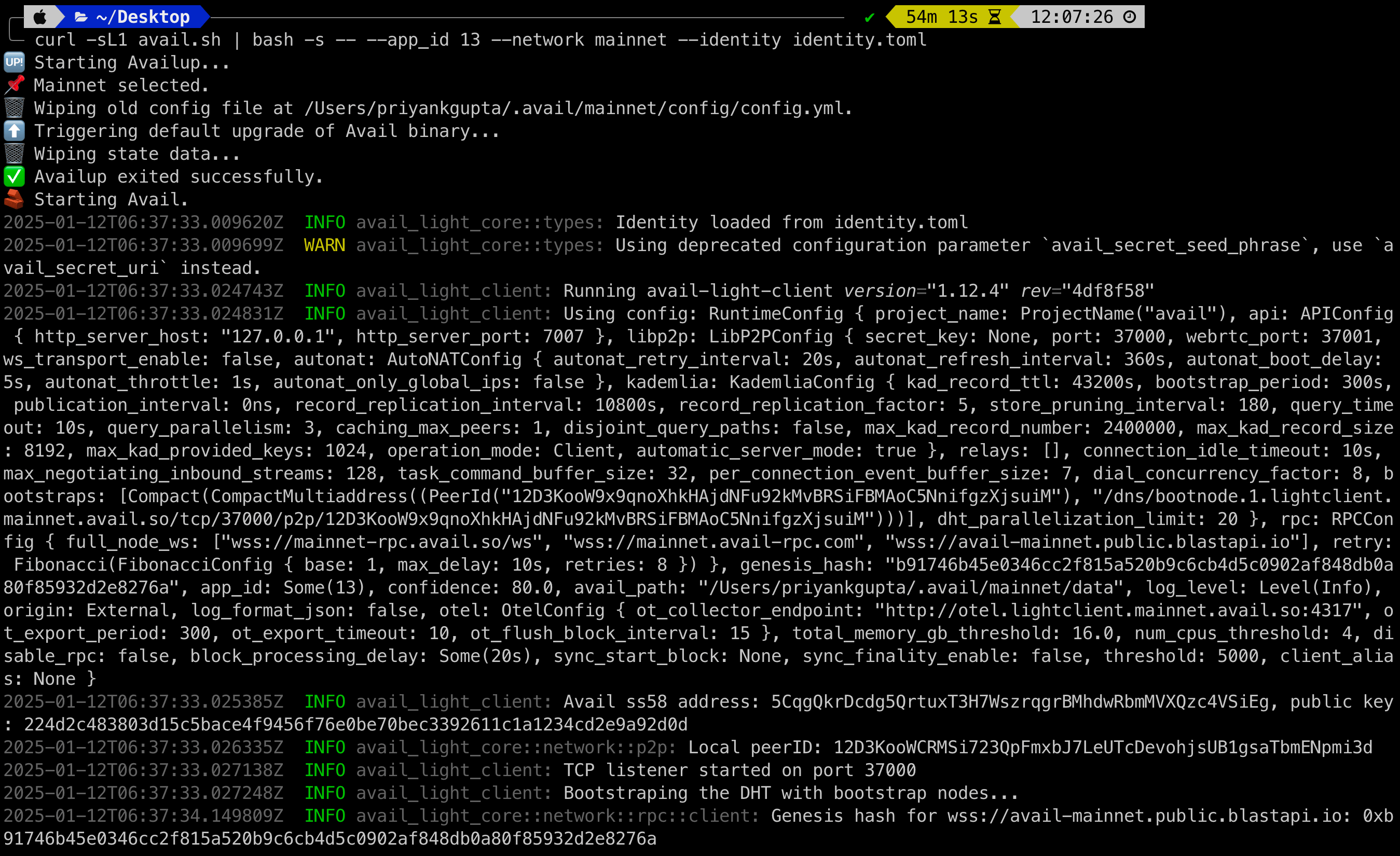
Pass this file to the light client using the --identity flag like this. This could look something like this:
Note
CONFIG FLAGS
Availup supports many different config flags to support your needs.
Detailed documentation for them can be found in our Github repo.
availup is the recommended way of running the Avail light client for most users.
availup is a shell wrapper that allows you to spin up your own instance of the Avail light client
with a simple curl command.
Note
To run the Avail LC using availup, make sure you have curl installed on your system. To check, quickly:
curl --version
To spin up an Avail light client on the Turing testnet, just run this one command in your terminal:
If everything goes well, the client output will look like this:
Note
Please note this command worked for a system where the identity.toml file was in the same directory as the terminal.
You will need to pass the full path to the identity.toml file if it is located elsewhere.
For MacOS machines that run on x86_64 based Intel processors, run:
You can configure the run command with a variety of config flags.
Note
CONFIG FLAGS
You can run the Avail light client with different flags to configure it according to your needs.
Detailed documentation for them can be found in our Github repo.
Building the Avail light client from source is a more advanced option that
provides you with the maximum flexibility.
To do so:
Clone the Avail light-client repo and checkout to the specified version: